![ShippyPro Logo-1.svg]](https://help.shippypro.com/hubfs/Imported%20sitepage%20images/ShippyPro%20Logo-1.svg)
Temu is a global e-commerce marketplace that primarily operates in the European market.
Currently, only the EU (Europe) market is supported, while the US and Global markets are under development.
Summary:
1. Connection steps
Let's connect this Marketplace to instantly import your orders so that you can start shipping more effectively.
- Visit the Marketplaces section and click on TEMU.
- Once the connection popup has opened, you need to get your Access Token from TEMU Seller Center.
-
To obtain the Access Token:
-
Log in to your TEMU Seller Center: https://seller-eu.temu.com/
-
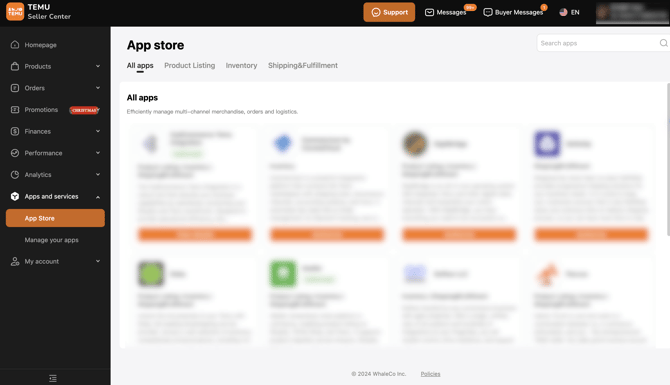
Go to Apps and Services > App Store
-
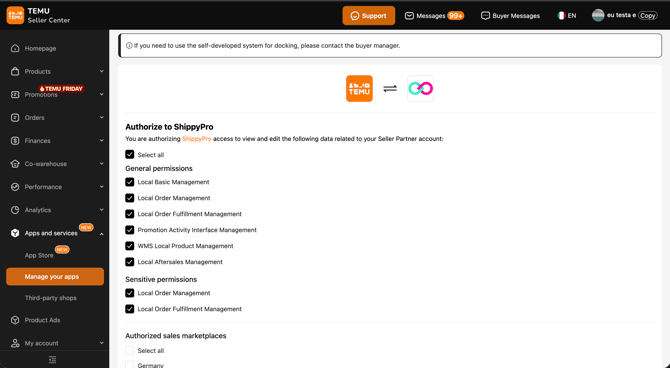
Select ShippyPro from the list of available apps
- Check the permissions that will be granted to ShippyPro for your store
-
Click Submit at the bottom of the page
-
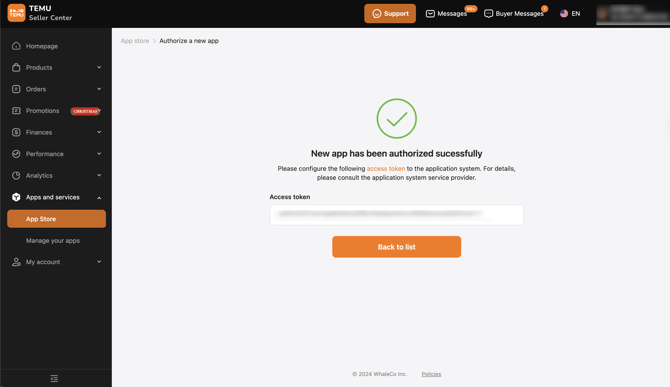
Copy the access token that appears on the confirmation screen.
-
- Return to ShippyPro and paste the Access Token in the connection modal.
- Click Connect to finalize the connection.
- If you want, you can also enter a Custom Label to recognize the connection among all the others.
2. Additional options
Available Features:
- Automatic update order
- Filter per order's status (All, Pending, Awaiting shipment, Received)
- Product images import
- Products SKU import
- Email Address import
- Mobile Phone import (supports backup mobile)
- Item Descriptions import
- Currency: EUR (default)
Unavailable Features:
- Live rates at CheckOut
- Drop off at CheckOut
- Import products weight/dimensions
- Bi-directional Track and Trace (tracking upload only)
- Priority syncing
- Pending orders acceptation
Import Order Status
Available status options:
-
- 0: All - imports all orders
- 1: Pending - imports pending orders
- 2: Awaiting shipment - imports awaiting shipment orders (DEFAULT)
- 5: Received - imports received orders
3. Troubleshooting & Errors
Imported order amounts and Seller Center differences
Do the amounts imported from Temu differ from what you see in your Temu Seller Center? Here's how ShippyPro reads the amount fields returned by Temu.
ShippyPro retrieves order amounts through the Temu endpoint bg.order.amount.query. The relevant fields are:
- Total Value: mapped to customerPaid > amount. This represents what your customer actually paid after applicable discounts.
- unitBasePrice / basePrice: base-price fields in the Temu API response. These can differ from customerPaid, so comparing base prices with the imported Total Value can show different amounts.
- parentOrderMap.shipAmountTotalTaxIncl.amount: the shipping-total field returned by the same endpoint.
📌 Note: The mapping to customerPaid is deliberate. It preserves discount handling and other order-import logic. Switching to base-price fields could reintroduce earlier import issues and affect other merchants using Temu.
For other marketplace issues, see How to fix Marketplace general issues.
4. FAQs
1. When and where will my orders be imported? [Will product images be imported? Are orders imported in batches?]
Orders are imported automatically from your Temu seller account. Product images and descriptions are imported along with order data. Orders are imported in batches of up to 100 orders per page, for a total of 1000 orders.
2. Can I connect my TEMU account to more than one ShippyPro profile?
Yes, you can use the same Temu access token on multiple ShippyPro profiles if needed.
3. Can I import the products weight on ShippyPro?
No, Temu does not provide product weight and dimensions through their API, so this information cannot be imported automatically.
4. Will Temu be updated with the Status Shipped and Tracking information?
Yes, when you ship an order through ShippyPro, the tracking number and carrier information are automatically sent to Temu and the order status is updated to "Shipped".
5. I cannot see the order costs. What should I do? To display order costs in ShippyPro, access the Temu app and select Edit Permissions. Even if all permissions are already enabled, generate a new token and update it in the Marketplace section of ShippyPro.
6. Why Temu is only importing orders from a single country store?
-
Check if you have separate Temu seller accounts/stores for different countries
-
Check which country store was selected in the Seller Central when you generated the current token
-
If you have different Celler Centrals for each Country try to generate a separate access token for each country store and create separate connections for each Country in ShippyPro