![ShippyPro Logo-1.svg]](https://help.shippypro.com/hubfs/Imported%20sitepage%20images/ShippyPro%20Logo-1.svg)
How to use Returbo with ShippyPro
Summary:
3 How the integration with ShippyPro works
4 Return Label Generation Options
5 Setting Up Tracking (Webhook Configuration)
6 FAQ
Overview
Returbo is a third-party Shopify app for post-purchase request management, that allows your customers to self-register returns, exchanges, and complaints through an embedded form on your website — with auto-generated labels and automatic tracking included.
Prerequisites
Before using Returbo with ShippyPro, make sure the following are in place:
- Returbo installed and configured on your Shopify store
- ShippyPro API section enabled on your account
- Your carrier integrations added to ShippyPro (e.g., PostNord, UPS, DHL)
- Shipping rules and conditions set up in ShippyPro
- Carriers confirmed as active and configured for return shipments
Getting Started
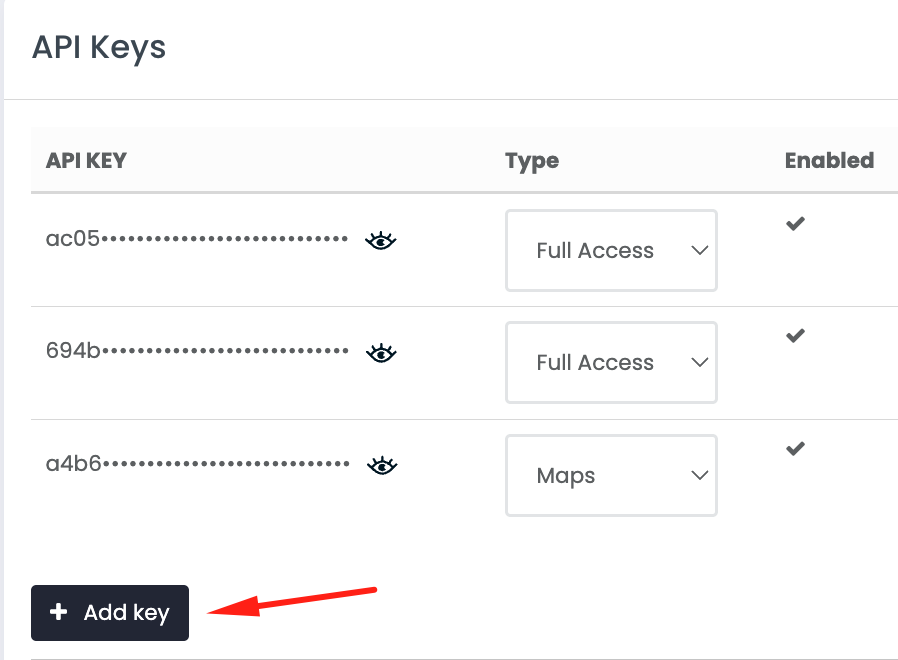
Step 1: Get Your ShippyPro API Key
You'll need your ShippyPro API key to connect Returbo to your account. You can find your API key in your ShippyPro API page.
Step 2: Configure Returbo with ShippyPro Integration
In your Shopify admin:
- Open the Returbo app
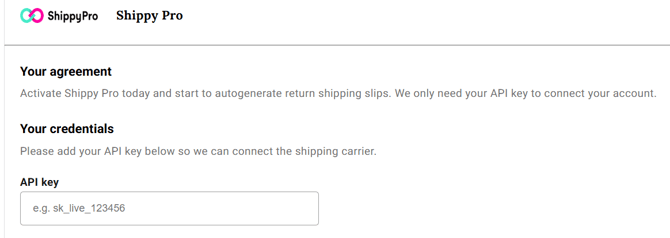
- Go to Shopify Apps > Returbo > Settings > Integrations > ShippyPro
- Enter your ShippyPro API key in the field provided
- Click Save
Returbo is now connected to your ShippyPro carrier connections and shipping rates.
For additional information visit the Returbo Help Center and official website.
Need more help with configuration? Schedule a Demo or Setup call with Returbo Team.
How the integration with ShippyPro works
Once customers submit return, exchange, or complaint requests through the Returbo digital form, Returbo verifies eligibility against your configured rules (deadlines, return reasons, etc.) and approves requests automatically or manually depending on your settings.
The ShippyPro API is then called to fetch available carrier rates — based on your ShippyPro carrier connections and shipping rules — and generate the return label, which Returbo automatically delivers to the customer.
Note: All API calls are tracked in the API Logs section of your ShippyPro account.
Return Label Generation Options
You can choose how Returbo generates return labels in your Returbo settings:
Automatic Label Generation
- Returbo automatically generates the label as soon as a return is approved
- The system calls ShippyPro's rate API to retrieve all available shipping options for the return
- If more than one carrier option is available, Returbo automatically selects the option with the lowest rate for that specific return
- No manual action needed from you
Manual Label Generation
- You choose which shipping option to use for each return
- When a return reaches approval status, you select ShippyPro as the return shipping method
- A list of available shipping options appears — including carrier name and rate for each option
- You can then choose the best option for that specific return and confirm
Setting Up Tracking (Webhook Configuration)
To enable automatic tracking updates when returns are shipped, you need to add a webhook in ShippyPro. You only need to do this once.
Find Your Shopify Domain
- Log in to your Shopify Admin
- Click Settings in the bottom left corner
- Select Domains
- Copy your default .myshopify.com URL (e.g., your-store.myshopify.com) — this is what you'll need below
Add the Webhook in ShippyPro
- Log in to your ShippyPro account
- Go to API in the navigation
- Find the Webhook block on the page
- Click Add Webhook
- Fill in the fields as follows:
Webhook URL:
https://returboapp.com/shopify/api/webhook/shippy-pro/tracking-update/[YOUR DOMAIN]
Replace [YOUR DOMAIN] with your Shopify store URL.
Example: https://returboapp.com/shopify/api/webhook/shippy-pro/tracking-update/your-store.myshopify.com
Webhook Events: Select "Tracking Update"
Retry Count: Enter 1
Custom Header:
- Click Add Custom Header
- Key: X-Auth-Token
- Value: (contact Returbo support at support@returbo.io to receive your token)
- Click Save Webhook
If everything is filled in correctly, the webhook will save successfully. If it doesn't save, double-check that all fields are filled in exactly as shown above.
Once tracking is enabled, Returbo automatically moves a return from Incoming to Pending Approval as soon as it's been delivered to your location — no manual action needed.
FAQ
Do I need to configure anything in the ShippyPro UI?
No, once the API section is enabled and your Returbo integration is active no UI changes are required on the ShippyPro side.
Is Returbo available for all Shopify plans?
Yes, Returbo is available for all Shopify plans. For additional information refer to Returbo official Pricing Page.
Is inventory sync available via Returbo?
Yes, Returbo keeps track of your stock in real-time, so you'll always know what's available. Your customers get up-to-date info on product availability.
How will my customers' return requests be approved?
In Returbo you can choose to either automatically approve return/exchange requests (i.e. customers receive a return shipping slip immediately after registering a return in the portal) or to review them manually before approval (i.e. generate the return shipping slip only after the request is approved).
Will my shipments be visible both in Returbo and ShippyPro?
Yes, your shipments will be visible both in Returbo and ShippyPro.
How will my end customers receive the return label/QR-code and notifications?
Depending on your carriers and settings, Returbo allows you to forward the return label or QR-Code and customize notifications via email or phone.
Will I be able to customize my return reasons, rules and deadlines?
Yes, Returbo allows you to customize the eligible return reasons, deadlines, and rules (e.g. per country, SKU, custom products, etc.).
Does the order need to have been delivered to initiate a return or exchange request?
Returbo will check if the order status is "Fulfilled". You will be able to choose your Return Deadline from Returbo settings directly.
Does Returbo support automatic tracking updates?
Yes, when the return has been shipped, Returbo automatically tracks the return. When the return's status changes, an automated email is sent to your customers. (See "Setting Up Tracking" section above for webhook configuration.)
What should I do if label generation fails?
Here are the most common reasons why a return label cannot be generated and what to do about each:
The item has no weight
ShippyPro needs product weight information to calculate shipping rates. If a product has no weight set, automatic label generation won't be possible. When this happens, the return will sit in Request Submitted status. You can add the missing weight directly in Returbo from there.
There is an issue with the customer's address
Address problems are one of the most common causes of label failures. The return will land in Request Submitted status, where you can review and correct the address manually. Common issues include:
- Address line too long
- Incorrect or outdated postcode
- Tip for Swedish addresses: Use hitta.se rather than Google Maps to verify addresses — Google Maps can sometimes be out of date with recent postcode changes.
A ShippyPro setup or technical issue
If the problem is related to your ShippyPro configuration or a technical issue on their end, Returbo will display a specific error message. Contact ShippyPro customer support directly for help resolving it.
Do I need to contact ShippyPro or Returbo if I face an error?
For any question related to Returbo configuration in Shopify (rules setup, workflows, etc.) or the Returbo interface and billing, check Returbo Help Center and contact Returbo support directly if needed.
For any question related to carrier connections, shipping rates, label generation errors, or your ShippyPro account settings, contact ShippyPro Support.