![ShippyPro Logo-1.svg]](https://help.shippypro.com/hubfs/Imported%20sitepage%20images/ShippyPro%20Logo-1.svg)
Let's see how you can integrate DHL Parcel DE Returns with ShippyPro in just a few steps.
Before connecting DHL Parcel DE Returns to ShippyPro, make sure you have the following:
- An active DHL Parcel DE Returns account
- Your DHL Parcel DE Returns API credentials (username and password)
- Your Receiver ID, provided by DHL — this is required to generate return labels. If you don't have it, contact your DHL account manager or sales representative
Note: The Receiver ID can be configured directly in the connection modal. Alternatively, it can be set as a carrier option after connection — in that case, the carrier option value takes priority over the one entered in the modal.
- Log in to your ShippyPro account
- Go to the Carriers page
- Find the DHL Parcel DE Returns logo and click on it
- The connection modal will open — fill in the following fields:
| Field | Description |
|---|---|
| Username | Your DHL Parcel DE Returns API username |
| Password | Your DHL Parcel DE Returns API password |
| Receiver ID |
Your DHL-assigned Receiver ID (required if not set as a carrier option) |
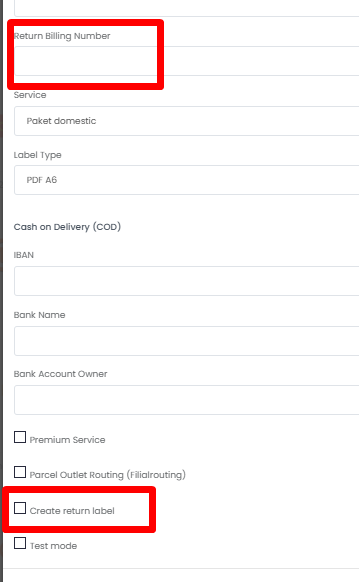
| Return Billing Number |
Enter the DHL account number to be used for generating return labels. To include a return label in the shipment box together with the outbound label, you must also enable the “Create Return in the Box” option in the section below. |
- Click Connect to save your credentials
- ShippyPro will validate your credentials automatically — you'll receive a confirmation if the connection is successful
DHL Parcel DE Returns supports the following shipping destinations:
| Destination | Supported |
|---|---|
| National (Germany) | ✅yes |
| EU | ✅yes |
| International | ✅yes |
Note: This integration is designed specifically for return shipments. It supports return label generation only — outbound shipping labels are not available through this integration.
Label (PDF): Available
Label (ZPL): Available 10X20cm & 10x15cm
Track & Trace: Available
Credentials Validation: Available
Return Labels: Available
Return Label in the box: Available (you will need to set the Return Billing Number and flag the option Create Return Label)
Receiver ID as a Carrier Option
If you manage multiple accounts or need to override the Receiver ID set in the modal, you can configure it as a carrier option directly from your carrier settings in ShippyPro. The value set as a carrier option always takes priority over the one entered during the connection setup.
| Carrier Option | Slug | Type | Description |
|---|---|---|---|
| Receiver ID | receiver_id |
Text | Your DHL-assigned Receiver ID |
Label format
DHL Parcel DE Returns generates labels in PDF format. ZPL and EPL label formats are not supported for this integration.
4. Errors & Troubleshooting
To check: ["status":["title":"Bad Request", "status":400,"detail":"0 of 1 shipment successfully printed.","statusCode":400], "items": [["sstatus":{"title":"Bad
Request", "status":400,"statusCode":400], "validationMessages":[["property":"consignee.name1","validationMessage": "Please enter Name 1.", "validationState":"Error"]]]]]
Check the company name field and make sure you have not left extra spaces.