![ShippyPro Logo-1.svg]](https://help.shippypro.com/hubfs/Imported%20sitepage%20images/ShippyPro%20Logo-1.svg)
Keep reading to connect your DHL eCommerce Poland account and start shipping. 🔎
Summary
1. Before you start
First things first: have you a DHL eCommerce Polish Customer Number? If not, contact DHL Helpdesk at pl.cim@dhl.com.
Then register your User Account on DHL PL website at dhl24.com.pl and wait for confirmation.
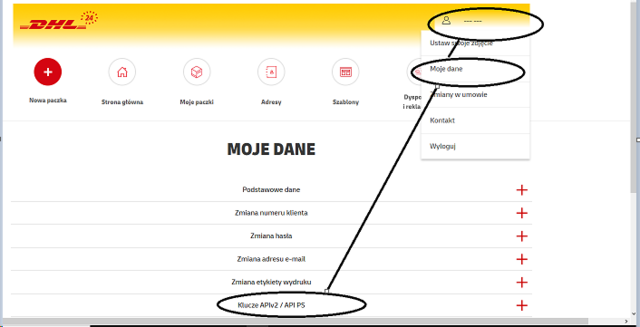
Once received it, generate your own access to API as shown below:
2. Connection steps
Now add your data going to Carriers > DHL eCommerce PL Logo.
Together with the Username and Password you'll need to add:Parcelshop Username
Parcelshop Password
SAP Number
And select your Product between:
DHL Parcel Premium
DHL Parcel Polska
DHL Parcel 09
DHL Parcel 12
DHL Connect (international)
DHL International (international)
Domestic Return
International Return
Sender Address
💡 If you'd like a non-Polish address printed on the label, you have to contact your DHL eCommerce PL Sales for a setting on Carrier's side.
As well as you Label Type:
PDF
ZPL
3. Additional options
-
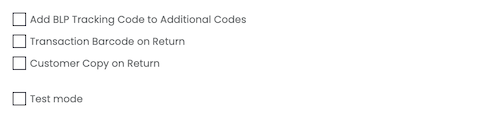
Add BLP Tracking Code to Additional Codes
-
Transaction Barcode on Return
-
Customer Copy on Return >
-
Test mode > by enabling this option it allows you to create some test shipments
📌 Kindly note that in case of Cash On Delivery it's mandatory to add Insurance value equal to the total of the order.
⚠️Carrier Option: Non standard has to be enabled in case of exceptions to the service definitions in terms of weights and dimensions: https://www.dhl.com/pl-en/home/our-divisions/parcel/business-customers/domestic/offer.html
If you want, you can also enter a Custom Label to recognize the connection among all the others.
4. Errors
Error 117 — Error in the sender's address details: Please enter a valid postcode
This error is triggered by DHL eCommerce PL's validation of the sender's postcode. DHL Poland expects postcodes in a specific Polish format (e.g., XX-XXX). If the sender address contains a postcode that doesn't match this format — or is missing entirely — the carrier will reject it.
How to solve it
There are two possible root causes:
-
The sender address has an invalid or missing postcode → Check the sender address set in the carrier connection or on the shipment itself and make sure the postcode is correctly formatted (Polish format: XX-XXX, e.g., 00-001).
-
The sender address is non-Polish → This is a known limitation of DHL eCommerce PL. If you'd like a non-Polish address printed on the label, the customer must contact their DHL eCommerce PL Sales representative to have this configured on the carrier's side. ShippyPro cannot bypass this restriction unilaterally.
Error 106 — Shipment validation errors: Service not available in this country
This error means the selected service/product is not available for the origin or destination country of the shipment. DHL eCommerce PL has services split between domestic and international, and not all of them are available for every country combination.
How to solve it
Make sure that you are using the correct service for your shipments contacting your carrier representative.
Error 131 — Error downloading/retrieving product
According to the internal documentation, this error is specifically related to DHL service (product code) and indicates that the service you're trying to use is not supported for national (domestic) shipments.
How to solve it:
The service you selected is designated for international shipments only. If you're trying to ship domestically within Poland, you need to select a different service.