![ShippyPro Logo-1.svg]](https://help.shippypro.com/hubfs/Imported%20sitepage%20images/ShippyPro%20Logo-1.svg)
If you want to export shipment data regularly at no extra cost, you can do so for up to 90 days by following these simple steps:
- Go to Orders > Labels Generated and apply the desired filters
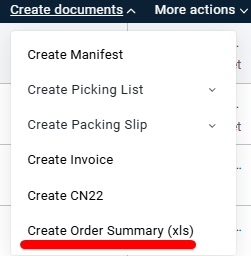
- Select the orders and click Create Documents
- Choose Create Order Summary
- Download and save the file
If you want to go beyond this limit and get a more detailed report, ShippyPro provides two tools:
Optimizer Premium
Optimizer Premium lets you download complete shipment data and access advanced metrics to monitor transit times, exceptions, and your carriers' delivery rate, supporting in-depth analysis and reporting. Export your data in CSV format to use in spreadsheets, business intelligence tools, or custom analytics workflows.
📌 You can export shipment history from September 1, 2023 onwards.
👉 For more information, go here: Optimizer Exports
GetShippedOrders API (Enterprise plans only)
You can get a complete and detailed overview of your entire shipment history with a single API call.
Here is a full list of the data you will be able to retrieve via this API call:
Result (OK/NOK)
Total
Orders
Marketplace Platform
Marketplace ID
Is printed
Transaction ID
To address street1
To address street2
To address city
To address state
To address zip
To address country
To address name
To address company
To address phone
To address email
From address street1
From address street2
From address city
From address state
From address zip
From address country
From address name
From address company
From address phone
From address email
Insurance
Insurance currency
Cashondelivery
Cashondelivery currency
Cashondelivery type
Label pdf url
Tracking code
Order status
Carrier name
Carrier id
Service name
Shipment cost
Shipment cost currency
Created at
Printed at
Order error message
Total sales
Payment method
Archived
Note
User note
Carrier note
Incoterm
Billaccountnumber
Items
Quantity
Price
SKU
Parcels Dimensions
👉 Contact sales@shippypro.com and we will provide a quote for activation.