![ShippyPro Logo-1.svg]](https://help.shippypro.com/hubfs/Imported%20sitepage%20images/ShippyPro%20Logo-1.svg)
With ShippyPro, you can send customers a copy of their shipping label directly from the Shipped Labels section.
Here how to proceed. 🔎
-
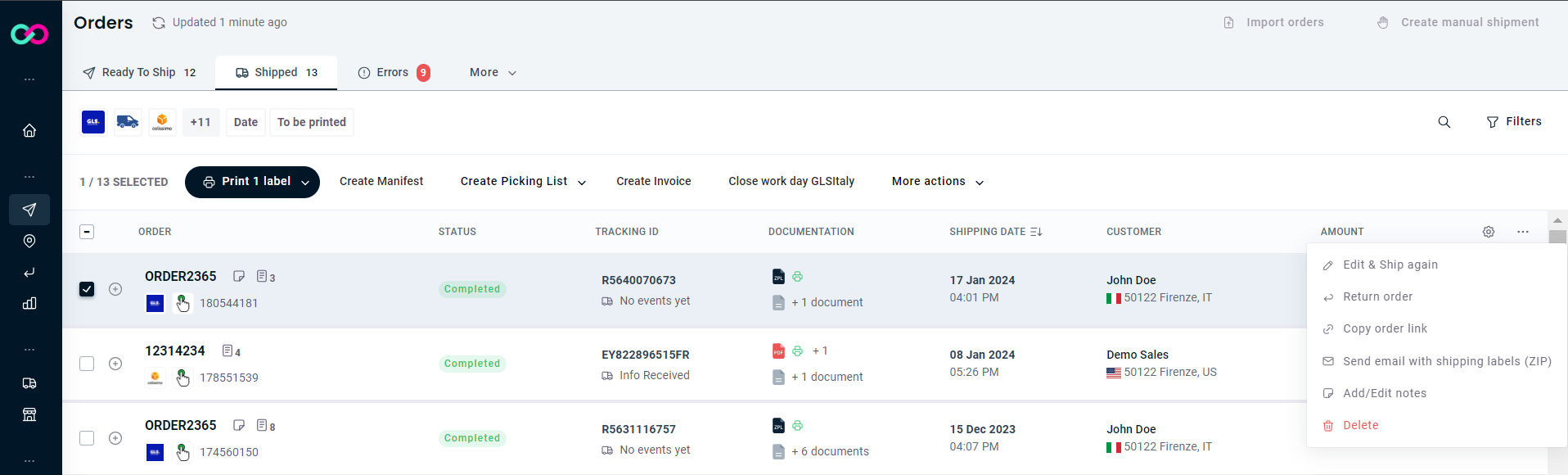
Go to Shipped Labels section and select the order for which you'd like your Customer to receive the label.
-
Once selected, click on the three dots in the right corner and then on Send Email with Shipping (ZIP).
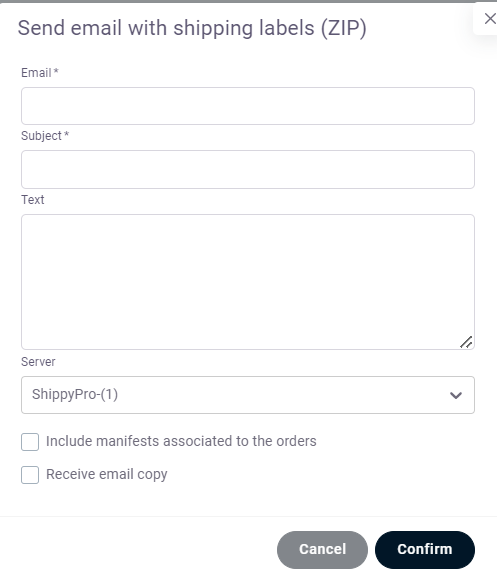
In the panel that appears, fill in the Email, Subject, and Body fields.
-
By connecting your own SMTP server, you can also customize your Sender Server settings.
To learn more about setting up a Custom SMTP Server, please read our dedicated guide. [Link to Custom SMTP Server guide — add URL before publishing]
-
Also, by clicking on Receive email copy the same message will be forwarded to your Email Inbox. 📩
The customer will now receive an email with their shipping label attached as a ZIP file.