![ShippyPro Logo-1.svg]](https://help.shippypro.com/hubfs/Imported%20sitepage%20images/ShippyPro%20Logo-1.svg)
Introduction
Let's see how you can integrate APC with ShippyPro in just a few steps to start shipping your parcels across the UK with next-day and economy delivery options.
Summary
- Before you start
- Connection steps
- Supported services
- Additional options
- Troubleshooting & Errors
- FAQ
1. Before you start
Before connecting APC to ShippyPro, make sure you have:
- An active APC account with HypaShip API access
- Your API username for HypaShip authentication
- Your API password for HypaShip authentication
- Verified that your account is authorized to ship to UK destinations
If you don't have an APC account yet or need your API credentials, please contact APC support or your APC account representative.
2. Connection steps
Follow these simple steps to connect APC to ShippyPro:
- Log in to your ShippyPro account
- Go to Carrier section
- Click on the APC Overnight logo
- Fill in the required credentials in the connection modal.
- Click Confirm to complete the connection
Required fields:
- Username: Enter your HypaShip API username (provided by APC Overnight)
- Password: Enter your HypaShip API password (provided by APC Overnight)
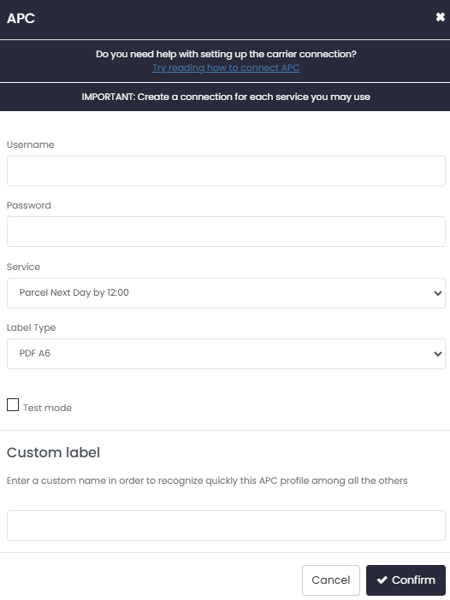
Once saved, APC will appear as an active carrier in your account and you can start creating shipments.
3. Supported services
APC offers the following shipping services through ShippyPro:
- Parcel Next Day by 12:00
- Parcel Next Day by 16:00
- Courier Pack Next Day by 12:00
- Courier Pack Next Day by 16:00
- Lightweight Next Day by 12:00
- Lightweight Next Day by 16:00
- Parcel 2 Day by 16:00
- Parcel 3-5 Day by 16:00
- MP16 Nextday Mailpack by 16.00
All services are available for UK domestic destinations.
4. Additional options
Label formats
APC supports the following label formats:
- PDF A6
- ZPL
You can set your preferred label format in your carrier connection.
Multiparcel shipments
APC supports multiparcel shipments, where you can send multiple parcels under a single order:
- Each shipment receives a master tracking number
- Each individual parcel gets its own tracking number (format: master number + 001, 002, etc.)
- Each parcel has its own label with the individual tracking number
- You can track each parcel independently
5. Troubleshooting & Errors
"Authentication failed"
- Cause: The username or password entered is incorrect
- Solution: Verify your API credentials with APC support and ensure there are no extra spaces or characters
"Invalid service code"
- Cause: The selected service is not available for your account or destination
- Solution: Check with APC which services are enabled for your account
"Invalid address"
- Cause: The delivery or collection address is incomplete or incorrectly formatted
- Solution: Ensure all required address fields are filled in correctly, including postcode, city, and address lines
"Label not available"
- Cause: The label is not yet ready after shipment creation
- Solution: Wait a few moments and try retrieving the label again. APC's system may need a moment to process the order
6. FAQ
Q: What countries can I ship to with APC?
A: APC currently supports UK domestic shipments only. Both sender and recipient must have UK addresses.
Q: Can I track my APC shipments through ShippyPro?
A: Yes, APC tracking is fully integrated with ShippyPro. You can view the complete tracking history with detailed status updates directly in Label Generated section.
Q: What label formats does APC support?
A: APC supports PDF A6 labels and ZPL thermal labels.
Q: Can I send multiple parcels in one shipment?
A: Yes, APC supports multiparcel shipments. Each parcel will receive its own tracking number and label, while being part of the same order.
Q: Can I cancel an APC shipment after creation?
A: Yes, you can cancel APC shipments through ShippyPro before they are collected. Once cancelled, the tracking number will be invalidated.
Q: What's the difference between Parcel, Courier Pack, and Lightweight services?
A: These are different service tiers offered by APC with varying price points and parcel specifications. Contact APC for details on which service best fits your shipping needs.
Q: Can I schedule pickups with APC through ShippyPro?
A: No, pickup scheduling is not currently available for APC through ShippyPro. Please arrange pickups directly with APC.
Q: Are there any size or weight restrictions for APC shipments?
A: Yes, APC has specific size and weight limits depending on the service selected. Please contact APC support for detailed information about their parcel restrictions.
Q: Why are my shipments being registered as Delivery Type "Third Party" instead of "Sender" in the carrier system?
A: The Delivery Type is automatically determined by the APC New Horizon portal. In particular, shipments are classified as "Third Party" when the collection details do not match the operational details configured in New Horizon. We recommend verifying that the Sender details you are using in your ShippyPro shipments match those registered in the APC portal.