![ShippyPro Logo-1.svg]](https://help.shippypro.com/hubfs/Imported%20sitepage%20images/ShippyPro%20Logo-1.svg)
Let's see how you can connect Magyar Posta to ShippyPro in just a few steps.

1. Before you start
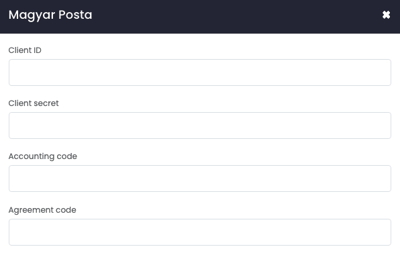
To connect Magyar Posta you need to follow these guidelines to retrieve your Client ID, Client secret, Accounting code and Agreement code
2. Connection steps
Once you got these data, input them from Carriers > Click on Magyar Posta Logo.
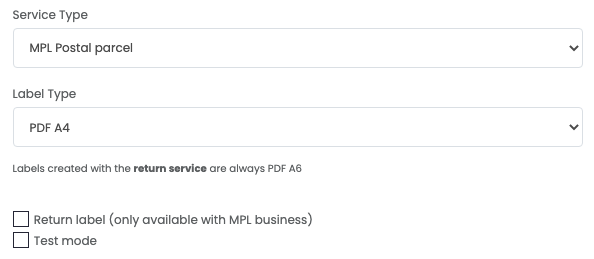
Select your Service Type between:
-
MPL Postal parcel (standard)
-
MPL Business parcel (Business)
As well as your Label Type.
- A4 PDF
- A4 ZPL
Kindly note that in case you'd like to employ ZPL format, all labels of this type generated by Magyar requires additional fonts to be installed, otherwise the label won't be generated correctly. Click here to download them.
Click on Return Label if you'd like to automatically generate the return label together with the shipment one
By enabling Test Mode you have the possibility to make some test shipments.
The "Test Mode" option should be flagged only if you have test credentials, not production credentials!
If you want, you can also enter a Custom Label to recognize the connection among all the others.
What should I do if I see the error: "The length of field recipient.contact.phone is invalid"?
Remove any extra spaces and symbols (such as “+”) from the recipient’s phone number field, then try again.
What you can do with Magyar Posta in ShippyPro
Here's what the Magyar Posta integration supports in ShippyPro.
- Features: Drop-off and pickup points, Cash on delivery, Return labels, Return label in the box, Insurance, Shipment cancellation, Multi-parcel shipments, Tracking, End-of-day close-out
- Label formats: ZPL, PDF
- Service types: MPL Postal parcel, MPL Business parcel
- Countries: Hungary
💡 Missing something? If you need a service or feature that isn't listed here, or would like more information, get in touch with us: we're here to help and can look into adding what you need.