![ShippyPro Logo-1.svg]](https://help.shippypro.com/hubfs/Imported%20sitepage%20images/ShippyPro%20Logo-1.svg)
Kerry Logistics is an Asia-based global solution that has positioned itself as a leader among Asia's emerging market areas. Discover how to connect this Carrier and get ready to expand your horizons.
Kindly note that Kerry Express integration currently supports only domestic shipments from and to Hong Kong
Summary:
1. Before you start
In order to connect Kerry Express you must be provided with Username and Password
2. Connection steps
Once you have retrieved all the information necessary you can proceed to connect the Carrier:
-
Navigate to Carriers and click on Kerry Express Logo.
-
Insert the Username and Password
-
Choose the service among the ones listed
3. Supported Services
You can setup a carriers connection for each service included in your agreement. The Carriers services can be chosen from the available services during the shipment creation process as they are transmitted directly through API.
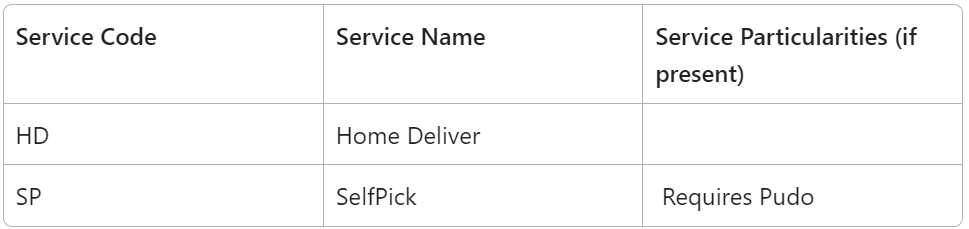
To manage return shipments and schedule home pickups, use the Carrier Options. Follow the steps below to complete them correctly:
- Pickup date must be in format YYYY-MM-DD
- Pickup time only AM or PM.
- Pickup Area must be: "Hong Kong Island": "HK", "Kowloon": "KL", "New Territories": "NT", "Outlying Islands": "OL"
- Pickup District max 50 characters
Example via API
"CarrierOptions": [
{
"name": "kerryexpresspickup_date",
"value": "2026-07-22"
},
{
"name": "kerryexpresspickup_time",
"value": "AM"
},
{
"name": "kerryexpresspickup_area",
"value": "NT"
},
{
"name": "kerryexpresspickup_district",
"value": "Sai Kung"
}
],
What you can do with KEX Express Hong Kong in ShippyPro
Here's what the KEX Express Hong Kong integration supports in ShippyPro.
- Features: Drop-off and pickup points, Cash on delivery, Return labels, Pickup booking, Multi-parcel shipments, Tracking
- Label formats: PDF
- Service types: Home Delivery, Self Pick, Returns
- Countries: Hong Kong SAR China
💡 Missing something? If you need a service or feature that isn't listed here, or would like more information, get in touch with us: we're here to help and can look into adding what you need.